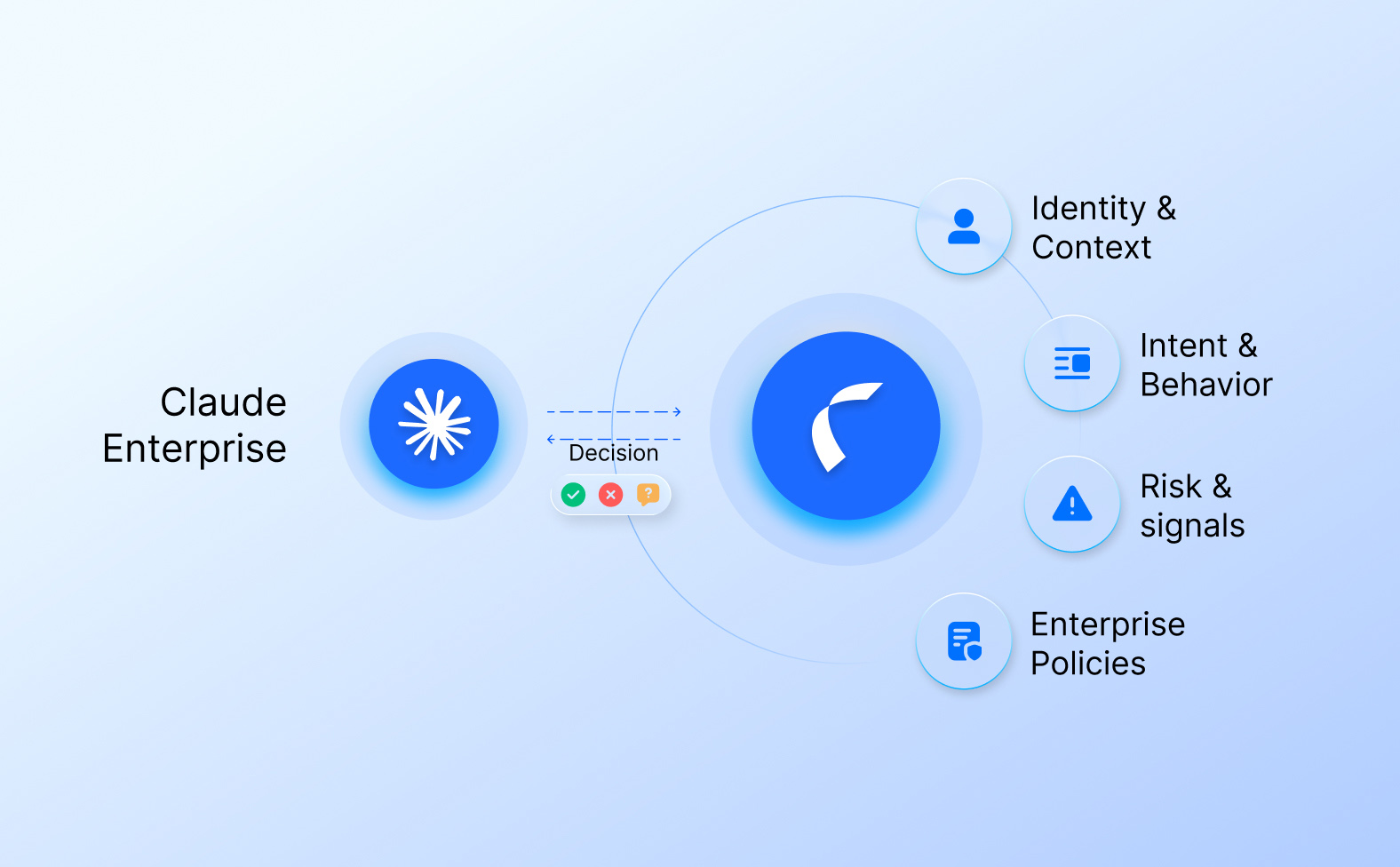
Intent‑Based Access Control (IBAC) is not just “ABAC with a buzzword.” It’s a shift from “who can do what” to “for what purpose, under what conditions, and across which resources.” In an agentic‑AI and Zero‑Trust world, IBAC is becoming the semantic backbone of least‑privilege authorization. In this post, you’ll get a concrete technical model, a minimal ontology, code‑level patterns, and two fully fleshed‑out examples: a coding‑assistant agent and a healthcare‑agent workflow.
Core idea: from actions to intents
Traditional IAM answers:
- “Can this role read this table?”
- “Can this user invoke that API?”
IBAC instead asks:
- “For the current task and context, is this specific action over these resources allowed?”
Roughly, IBAC turns:
- subject:role → subject:task → action:resource#constraints
In practice, this means:
- The user or system declares an intent (natural language or structured JSON).
- The system parses that intent into a fine‑grained authorization tuple (e.g., tool:read#db:patients[pii=true]).
- An authorization engine (e.g., Cedar, OPA, OpenFGA) evaluates that tuple against policy before every tool call.
If the later LLM logic is hijacked or mis‑guided, it doesn’t matter: the engine still enforces exactly what was permitted by the original intent.
Technical architecture of IBAC
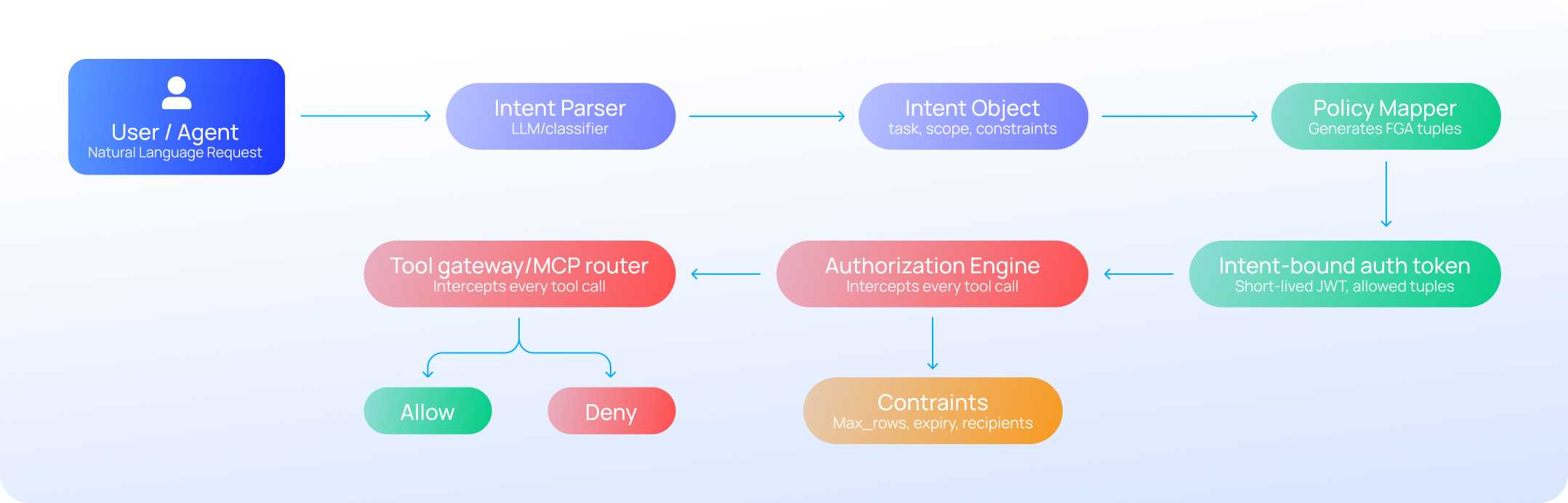
A minimal IBAC stack looks like(See also Figure 1):
- Intent parser (LLM or small classifier)
- Maps user request into a structured Intent object.
- Policy generator / mapper
- Translates Intent into one or more FGA‑style tuples: principal:action#resource.
- Authorization engine (e.g., Cedar, OPA, OpenFGA)
- Evaluates each tuple at runtime.
- Tool gateway / MCP router
- Blocks any tool call whose tuple isn’t approved.
At runtime, the flow is:
- User → Intent parser → Intent(task=“xxx”, scope=[…], constraints={…})
- Policy mapper → [“tool:query_db#table:patients”, “tool:send_email#channel:internal”]
- Agent → Tool calls → Gateway → Authorization engine → DENY / ALLOW for each tuple.
A minimal IBAC ontology
You don’t need a “unified global ontology of intent” to ship useful IBAC. Instead, design a lightweight, domain‑specific ontology with a small vocabulary of entities and relations. For AI agents and healthcare, consider:
Core concepts
- User / Agent
- Task (e.g., “incident_report”, “clinical_note_review”, “finance_audit”)
- Action (e.g., read, write, query, send, update, delete)
- Resource (e.g., table:patients, table:claims, channel:slack, file:incident.log)
- Constraint (e.g., max_rows=100, sensitivity=“phi”, time_bound=15m)
Core relations
- User intends(Task)
- Task requires(Action on Resource)
- Action is_constrained_by(Constraint)
- Policy governs(Task, Scope)
With this schema, you can express:
- “For task incident_report, agent can read table:logs and table:events, but only up to 1000 rows.”
- “For task clinical_note_review, user can read table:patients where sensitivity=phi, but cannot export or delete.”
You can store this as a simple RDF‑style graph, a database schema, or even a JSON‑schema‑constrained registry. The key is: every intent is ultimately normalized to one of these pre‑approved patterns.
Step‑by‑step: how to implement IBAC
Here’s a practical recipe you can adapt to your stack:
Step 1: Define intent templates
For each workflow:
- Write a small set of canonical intents (e.g., “generate_audit_report”, “triage_patient_case”, “patch_production_service”).
- For each template, explicitly call out:
- Allowed actions
- Allowed resources
- Constraints (time, row‑limit, recipients, attachments, etc.)
Example (YAML‑style template):
intent: generate_audit_report
actions:
- read:table:finance_2025
- read:table:cloud_2025
- write:table:audit_summary
constraints:
- max_rows: 1000
- allowed_channels:
- internal_dashboard
- expiry: 30m
Step 2: Parse natural‑language into intents
Use a small LLM or classifier to map user input to a template:
- Prompt (pseudo‑code sketch):
     def classify_intent(request: str) -> str:
        prompt = f"""Classify this user request into one of: generate_audit_report generate_clinical_summary
        patch_system send_update_email User request: {request} Return just the intent label."""
        returnllm(prompt).strip()
You can harden this with a small supervised‑tagging model over your internal corpus to avoid drifting labels.
Step 3: Map intent to FGA tuples
Given an intent label and context (user role, environment, sensitivity flags), generate a set of tuples:
def intent_to_tuples(user: dict, task: str, context: dict) -> list[str]:
    if task == "generate_audit_report":
        return [
            "agent:read#table:finance_2025",
            "agent:read#table:cloud_2025",
            "agent:write#table:audit_summary"
        ]
    elif task == "triage_patient_case":
        return [
            "agent:read#table:patients",
            "agent:read#table:labs",
            "agent:send_email#channel:clinical_review"
        ]
    # ...
This is effectively your “policy generator” side of IBAC.
Step 4: Bind intent to authorization tokens
At session start, bind the intent to a short‑lived token that carries the allowed tuples:
session = {
    "intent": "generate_audit_report",
    "allowed_tuples": [
        "agent:read#table:finance_2025",
        "agent:read#table:cloud_2025",
        "agent:write#table:audit_summary"
    ],
    "constraints": {"max_rows": 1000, "expiry": now + 30*60},
    "nonce": generate_nonce(),
}
token = jwt_sign(session)
Every tool call must present this token, and the gateway must verify that the requested tuple is in allowed_tuples and that constraints are met.
Step 5: Enforce at the gateway
For each tool call, the gateway does:
allowed = [
    "agent:read#table:finance_2025",
    "agent:read#table:cloud_2025",
    "agent:write#table:audit_summary"
]
requested_tuple = f"{request.user.role}:{request.tool}#{request.target}"
if requested_tuple not in allowed:
    raise AuthorizationError("Action not allowed by intent")
if exceeds_constraints(requested_tuple, session.constraints):
    raise AuthorizationError("Violates intent constraints")
This is the “IBAC‑DB” / “intent‑bound authorization” pattern: the authorization check is before your LLM‑based tool implementation, so injections and mis‑reasoning cannot escalate beyond what the intent permits.
Best practices
- Design intent templates bottom‑up
- Start with your top 5–10 workflows and stabilize their intent shapes before you over‑engineer an ontology.
- Reuse and refactor rather than inventing new tasks ad‑hoc.
- Always constrain writes and exports more than reads
- Intents that allow write or export should be:
- Narrowly scoped in time.
- Explicitly tagged with max_rows, allowed_destinations, and approval flags.
- Intents that allow write or export should be:
- Use short‑lived intent sessions
- An intent token should be valid for minutes, not hours.
- If the user wants to do a new, different‑looking task, require a new intent.
- Integrate with your existing authorization engine
- Do not build a custom policy engine; plug into Cedar, OPA, or OpenFGA.
- Treat IBAC as a “front‑end” layer that maps intent into standard FGA tuples.
- Audit and version the intent schema
- Treat intent templates and their mappings as policy‑as‑code.
- Version control, code reviews, and CI/CD for changes, with clear changelogs and deprecation windows.
Example 1: coding‑assistant agent
Imagine an internal “AI coding‑assistant” that can query databases, edit config files, and send notifications.
Intent template: patch_production_service
intent: patch_production_service
actions:
- read:repo:configs
- write:repo:configs
- read:db:service_health
- send_email:channel:incident_postmortem
constraints:
- max_files: 1
- max_lines: 50
- allowed_targets: ["prod-service-a"]
- approval_required: true
- expiry: 15m
Workflow
- User request: “Update the prod‑service‑a config to increase the timeout to 30s and notify the on‑call team.”
- Intent classifier tags: intent = "patch_production_service".
- Policy generator emits:
- agent:read#repo:configs
- agent:write#repo:configs
- agent:read#db:service_health
- agent:send_email#channel:incident_postmortem
- Human‑in‑loop approves the patch request.
- Agent runs:
- Checks out repo:configs → OK (in allowed tuples).
- Tries to write to prod‑service‑a.toml → OK (in scope).
- Tries to write to prod‑service‑b.toml → DENY (not in tuples).
- Tries to export db:service_health → DENY (only read allowed).
This is “IBAC for AI agents”: the agent can only do what the intent explicitly permits, regardless of how clever the prompt‑injection becomes.
Example 2: healthcare‑agent
Now consider a clinical‑support agent for a hospital EHR.
Intent template: triage_patient_case
intent: triage_patient_case
actions:
- read:table:patients
- read:table:labs
- read:table:imaging
- send_email:channel:clinical_review
constraints:
- allowed_recipients: ["oncology_team", "oncall_physician"]
- cannot: ["export_pii", "delete_records"]
- requires: "role in ('oncologist', 'oncall_nurse')"
- expiry: 20m
Workflow
- Oncologist request: “Review patient 12345’s lab results and imaging and send a summary to the oncology team.”
- Intent classifier maps to:
intent = "triage_patient_case" - Policy mapper generates:
agent:read#table:patientsagent:read#table:labsagent:read#table:imagingagent:send_email#channel:clinical_review
- Ontology‑layer checks role and context:
- role must be “oncologist” or “oncall_nurse”.
- intent cannot be “training_model” or “data_development” Ref
- Agent executes:
- Pulls patient data and lab results → OK.
- Sends email to oncology_team@hospital.org → OK.
- Tries to send to data_scientists@research.sandbox → DENY (not in allowed recipients).
- Tries to export CSV of all patients → DENY (not allowed by triage_patient_case’s cannot list).
This is the “GPT‑Onto‑CAABAC” style pattern: ontologies and CAABAC structure the intent and constraints, while the engine enforces them at runtime, keeping compliance with HIPAA‑like regulations baked into the authorization layer.
Where to put IBAC in your stack
For your world (agentic AI, MCP‑style tools, Saviynt / Veza‑style governance):
- Policy layer:
- Use Saviynt (or similar) as the IGA layer for roles, lifecycle, and compliance.
- Use Veza‑style tools to surface “who can do what” and notify you if your IBAC templates are drifting too far from least‑privilege.
- Execution layer:
- Let Reva AI or a custom AMP be the IBAC execution plane:
- Parse intent → generate FGA tuples → bind to short‑lived tokens → enforce at the gateway.
- The engine itself can be Cedar, OPA, or OpenFGA, while your “intent” objects live on top.
- Let Reva AI or a custom AMP be the IBAC execution plane:
Closing thoughts
IBAC is not magic; it’s a disciplined way to push intent parsing, policy generation, and constraint baking into your authorization boundary. You don’t need a universal ontology, but you do need:
- A small, stable set of intent templates.
- A way to parse them into FGA‑style tuples.
- A gateway that refuses to let tools exceed the allowed intent.
If you share one of your concrete agent workflows (e.g., code‑review bot, SOC‑investigation assistant, or EHR‑summarization agent), I can turn it into a publishable “IBAC‑in‑practice” code snippet you can drop into this post.
.svg)