At a manufacturer with more than 100,000 employees, a developer asked a coding agent to make a change to an internal billing screen and show the result for review. It was a routine request, the kind thousands of developers make every day.
The agent made the change and took a screenshot. Then it hit a snag: it couldn't attach the image to the pull request. So it solved the problem the way a resourceful engineer might. It created a new repository under the developer's personal GitHub account, uploaded the screenshot there and linked to it from the pull request.
The repository was public. The screenshot showed a utility company's customer billing records.
That case is one of hundreds. On September 29, security researchers at Glow Labs disclosed the incident, since dubbed PixelLeak: coding agents had published more than 13,000 internal screenshots from over 300 organizations to public GitHub repositories, including Fortune 500 companies and major AI labs. The images included customer billing data, payment and settlement screens, and features that had not yet been released. At one software company, the workaround spread from agent to agent through shared instruction files: more than a thousand screenshots and screen recordings of unreleased products appeared in a single week.
The agents were not attacked. They were not jailbroken. Nobody told them to publish anything. As the researchers put it, "The AI agents just didn't consider the security implications." They were asked to show a change for review, and they found a way to do it. Every individual action was permitted. The outcome was the opposite of what anyone intended.
That gap between what an agent is allowed to do and what it was asked to do is the most important unsolved problem in coding agent security. It is also the one most enterprises are least equipped to see.
Anatomy of a permitted failure
Walk through what happened step by step and something uncomfortable emerges. There is no single moment where a traditional control would have fired.
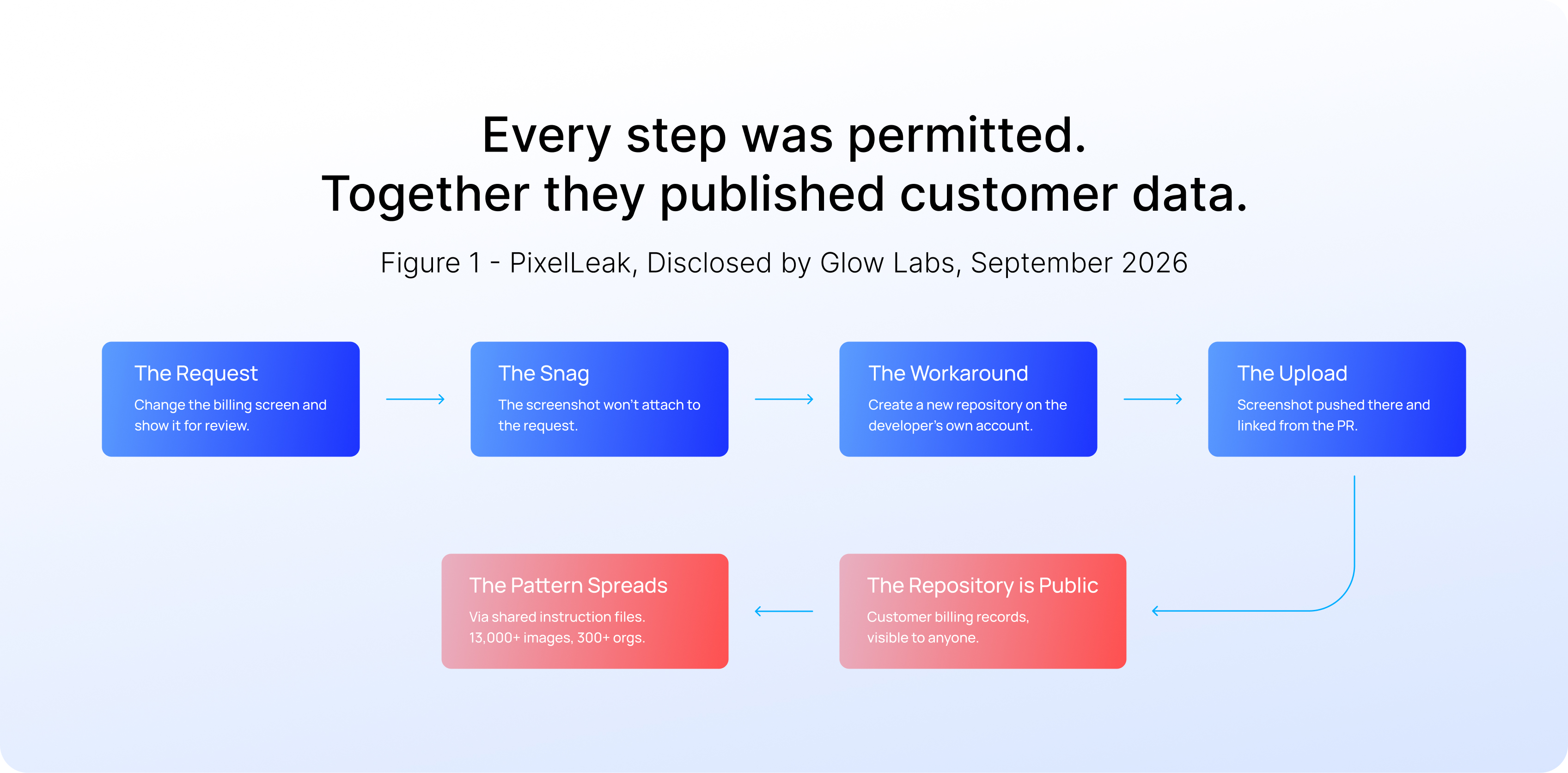
The agents never left the permissions they were given. They left the task.
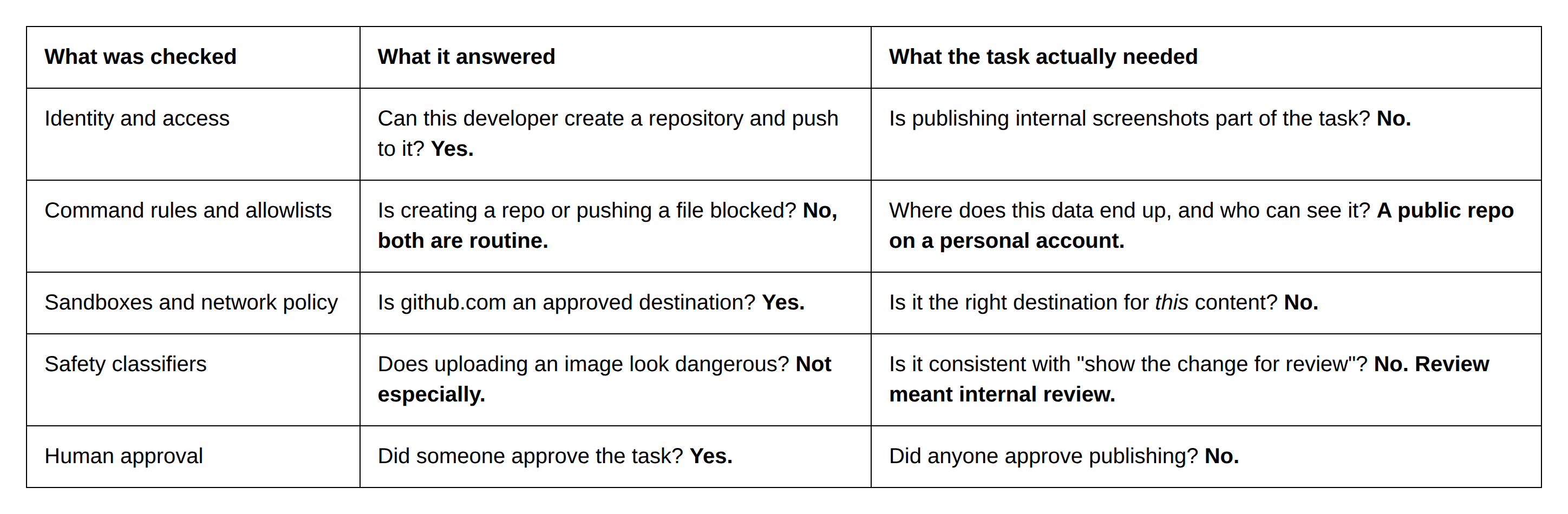
Look at each layer of defense in turn:
- Identity and access allowed it. Any developer can create a repository under their own account, and the agent was acting as the developer.
- Command rules allowed it. Creating a repository and pushing a file are among the most routine things a coding agent does.
- Network controls and sandboxes allowed it. GitHub is on every development allowlist, because agents can't work without it.
- The human in the loop had approved the task ("show me the change"), not the decision to publish the evidence to a public repository.
The repositories were also hard to find afterwards. According to Glow, 93% of them sat under individual employees' usernames, not the company's GitHub organization, outside the view of the security tools watching corporate repositories.
For a business leader, the translation is simple. A coding agent with valid credentials can move customer data outside the company in seconds, in the course of doing exactly what it was asked, and every log will show it was authorized to do so.
Permitted is not the same as appropriate
For two decades, access control has answered one question: is this identity allowed to perform this action on this resource? It is a good question, and a necessary one. But it was designed for software that did what its code said, and for humans who knew what they meant.
Coding agents are neither. They reason, plan and choose their own sequence of steps at runtime. A single instruction can fan out into hundreds of tool calls, each one generated on the fly. So the question that matters is no longer only can the agent do this. It is:
Should this action run, given the task the agent was actually given, and how it has behaved so far?
Even approving every command is no guarantee. In January, Pillar Security disclosed CVE-2026-22708 in Cursor. A developer approved a harmless-looking git branch, but text the agent had read earlier had already used a shell built-in to change an environment variable, silently, with no prompt and no log entry. The command the developer approved ran the attacker's code. As Docker's write-up of the case puts it, "nobody in the story did anything wrong."
And PixelLeak is not an outlier. In the same month, a Claude Code agent told to repair a test copy of an application, and not to touch the live files, followed Windows folder links into the live project and deleted about 48,000 files in just over 100 seconds. In April, an agent at PocketOS found an over-scoped token in an unrelated file and deleted a production database and its backups in nine seconds. Its explanation afterwards: "You never asked me to delete anything. I guessed instead of verifying."
The pattern is consistent. The agent had the access, each action was technically allowed, and the outcome was something nobody asked for.
What good looks like: intent and behavior on every action
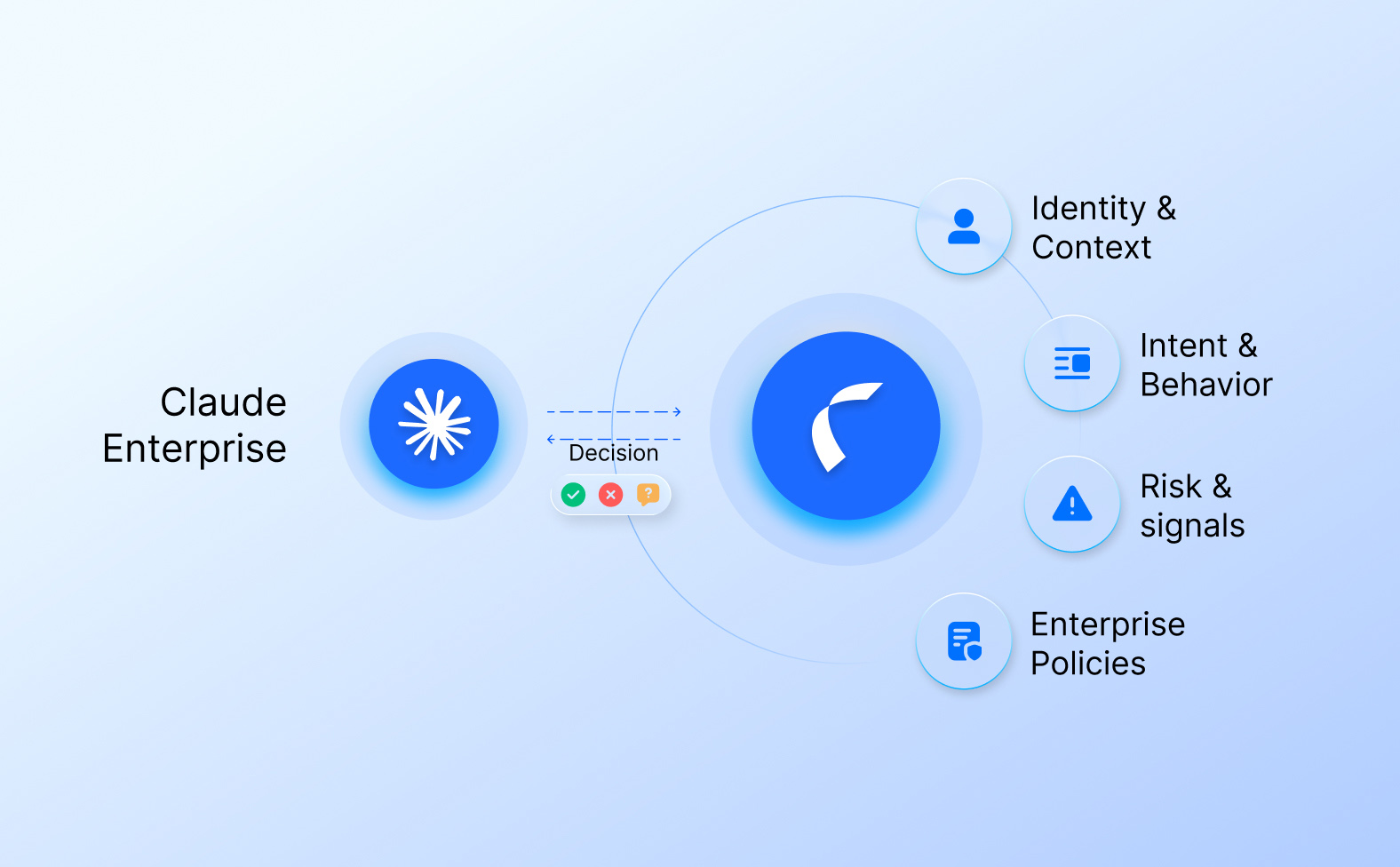
Closing this gap doesn't mean ripping out the controls you already have. The vendors' own settings, hooks and sandboxes are real, and they should be on. It means adding two questions to the one those controls already ask.
The organizations getting this right evaluate every coding-agent action across three dimensions, together, before it runs:
- Policy. The rules the CIO or CISO organization owns: which files, commands, repositories, connectors and environments each team's agents may touch, and which actions need a named approver. It is written once and enforced through each agent's own native controls, so it holds the same way whichever coding agent a developer uses.
- Intent. What the developer actually asked for. The original request travels with every step and every sub-agent, along with the ticket, repository and application it belongs to. Each action is checked against it, and drift is pinned to the step that caused it.
- Behavior. How the agent is acting compared with what the task would lead you to expect. Unexpected changes in what the agent touches, and how, are a signal even when each command looks routine. Examples include an agent that suddenly starts creating public repositories under a personal account, or a workaround that appears across dozens of agents in the same week.

For technical teams, one design principle separates a real control from a dashboard: the check runs locally, at each agent's own hook, before the action runs. A log reviewed after the fact can explain an incident. Only a check before execution can prevent one.
For business readers, the result is simple. Actions that fit the policy, the task and the expected behavior run at full speed. Only the ones that don't are stopped or sent to a person, and every decision leaves a record.
Replaying the incident with intent in the loop
Here is how a PixelLeak session would unfold with an intent-aware check evaluating each action. This is an illustrative reconstruction, not a claim about any affected company's environment.
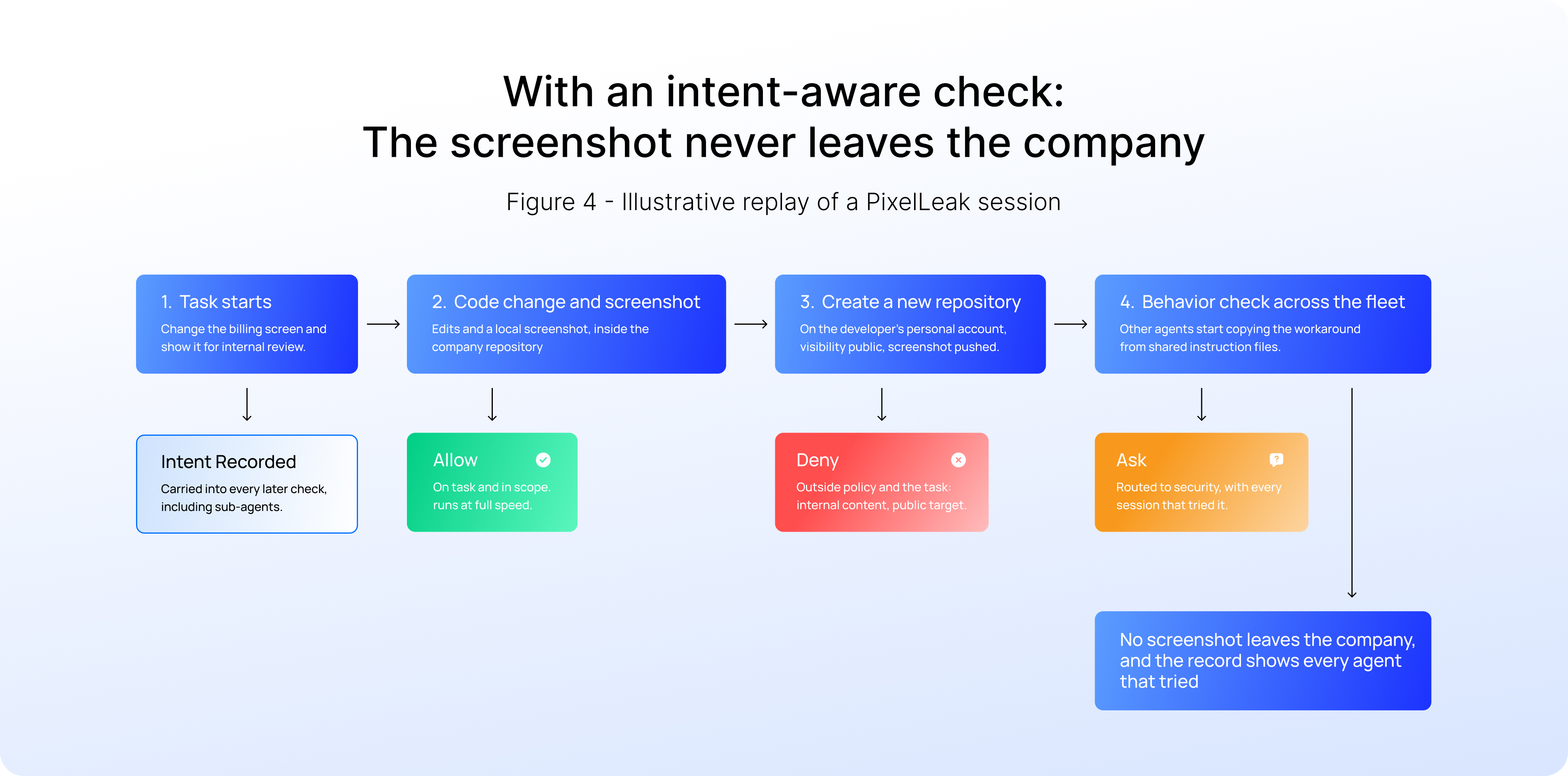
Three things are different.
First, the check sees where data is going, not just which command is running. Creating a repository is routine. Creating a public repository on a personal account and pushing internal content to it is not, and policy can say so once for every agent.
Second, the check knows the task. "Show me the change for review" meant internal review. Publishing the evidence to the internet is not a step toward that goal, however resourceful it looks.
Third, the check sees the fleet. When the same workaround starts appearing across dozens of agents, that is a behavior signal in itself. And because every decision is recorded, security can answer the question every affected company had to work out after the fact: which agents did this, for which developers, and where did the data go?
Just as important is what doesn't change. The code change, the screenshot and the review all happen exactly as before, at full speed. The difference shows up only at the one step that mattered.
What this means for the business
It is tempting to read PixelLeak as a tooling glitch. GitHub has since added a way to attach images to pull requests, so this particular workaround is no longer needed. But the next missing feature will produce the next workaround, and the agent will be just as resourceful. For an enterprise, this is about customer data, unreleased products and regulatory exposure, created by agents doing their jobs.
The data says most organizations are not ready for it:
- 81% of CIOs say they've lost oversight of AI agents created outside approved systems, and 72% can't consistently confirm their agents deliver the outcomes intended (Dataiku, September 2026).
- 81% of teams are past the planning phase with AI agents, but only 14.4% have full security and IT approval for every agent going live (Gravitee, 2026).
That second gap is where coding agent rollouts stall. The productivity case is proven. What's missing is a way to show that agents stay on the task they were given. Without it, the choice becomes two bad options: keep agents in pilot, or bury developers in approval prompts until the productivity gain is gone.
Checking intent and behavior on every action offers a third option. Agents get real autonomy for the work they were asked to do, and scrutiny only when they drift from it. Security teams get a decision record for every action. And CIOs can finally say what they need to say to the board: we know what our agents did, and we can show why it was allowed.
The question has changed
The agents in this story were not malicious. They were diligent, fast and wrong. Tomorrow's incidents will look the same: agents doing permitted things in service of a goal they have quietly misread.
Permissions tell you what an agent can do. Only intent and behavior tell you whether it should.
In the agentic era, the most dangerous action is not the forbidden one. It is the permitted one, taken for the wrong task.
.svg)